

Security threats evolve faster than most organizations can adapt. Businesses across every sector face increasingly sophisticated attacks targeting their digital assets, customer data, and operational systems. A Security Information and Event Management (SIEM) platform serves as the central nervous system for modern cybersecurity operations, and Microsoft's cloud-native approach has reshaped how security teams detect, investigate, and respond to threats. Understanding how microsoft siem capabilities work within Microsoft Sentinel enables organizations to build proactive security postures that scale with their infrastructure while controlling costs and complexity.
Microsoft Sentinel represents Microsoft's cloud-native microsoft siem solution built entirely on Azure infrastructure. Unlike traditional SIEM platforms that require on-premises hardware and complex licensing models, Microsoft Sentinel operates as a fully managed service that eliminates maintenance overhead while providing elastic scalability.
The platform architecture consists of four fundamental pillars that work together to deliver comprehensive security operations. Data ingestion happens through connectors that pull telemetry from Microsoft 365, Azure resources, third-party applications, and on-premises infrastructure. Analytics engines process this data using built-in machine learning models and custom detection rules. Investigation workbenches provide unified case management where analysts correlate alerts into actionable incidents. Automated response capabilities execute playbooks that contain threats before they spread.
Effective microsoft siem deployment begins with thoughtful data collection planning. Organizations must balance security visibility against storage costs and query performance. Microsoft Sentinel uses Log Analytics workspaces as its underlying data store, where ingestion costs scale with volume.
Priority data sources for comprehensive coverage:
Best practices for data collection emphasize filtering irrelevant logs at the source rather than ingesting everything and querying selectively. Pre-filtering reduces costs by 40-60% while improving query performance for time-sensitive investigations.
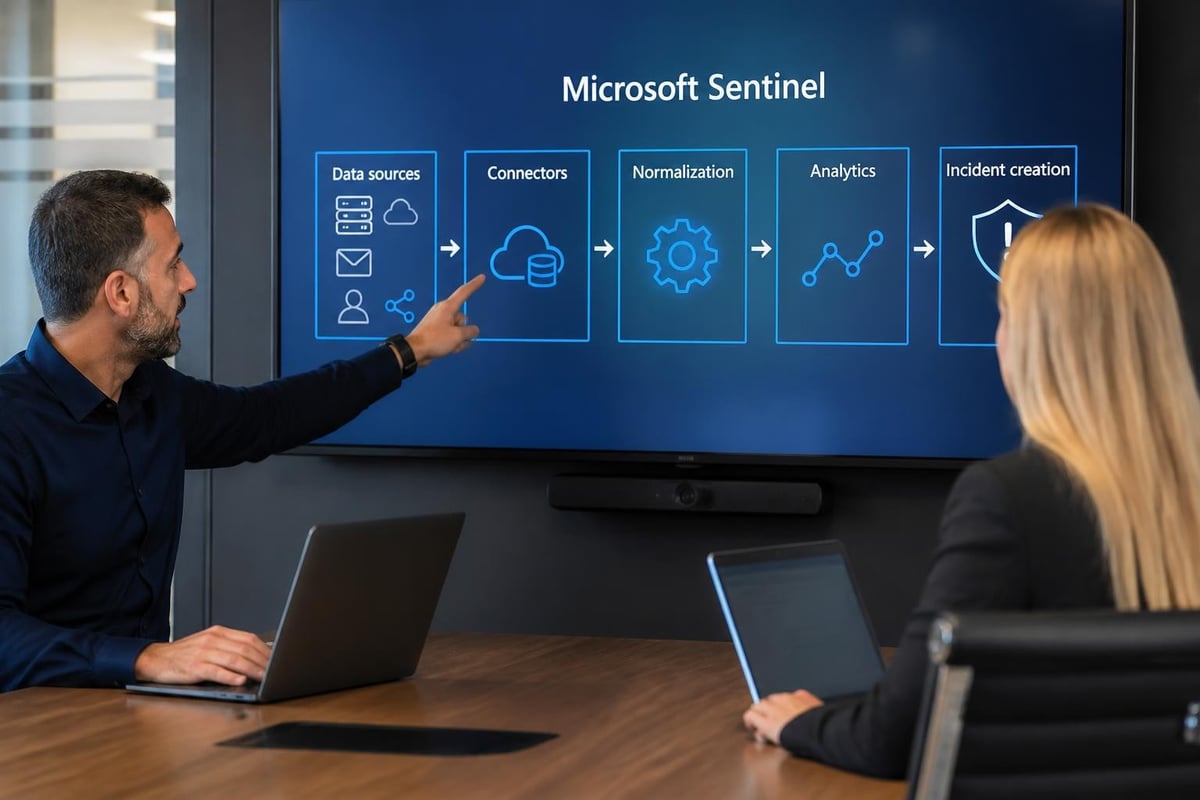
The Advanced Security Information Model (ASIM) normalizes data from different sources into standard schemas. This normalization allows analysts to write detection rules that work across multiple vendors without learning each product's unique field names and log formats.
Detection engineering transforms raw security telemetry into actionable intelligence through carefully crafted analytics rules. The microsoft siem platform supports multiple detection methodologies that complement each other to reduce blind spots.
Scheduled analytics rules execute KQL (Kusto Query Language) queries at defined intervals, searching for patterns that indicate compromise. These rules range from simple threshold violations to complex multi-stage attack chains that correlate events across time windows.
| Detection Type | Use Case | Typical Tuning Effort | False Positive Rate |
|---|---|---|---|
| Scheduled Query | Custom business logic, threat intelligence matching | High (ongoing refinement) | Variable |
| Microsoft Security | Alerts from Defender suite | Low (pre-tuned) | Low |
| Anomaly | Baseline deviation detection | Medium (threshold adjustment) | Medium |
| Fusion | Multi-stage attack scenarios | Very Low (ML-managed) | Very Low |
Machine learning analytics identify anomalies without explicit rules. The platform establishes behavioral baselines for users, entities, and resources, then flags significant deviations. For example, ML models detect when a user account suddenly accesses resources in unusual geographic locations or at abnormal times, even if individual actions appear legitimate in isolation.
Fusion detection combines weak signals across multiple data sources to identify sophisticated attack campaigns. These ML-driven correlations catch advanced persistent threats that evade single-indicator detections. The threat-hunting repository provides ready-to-use hunting queries that complement automated detections.
Threat intelligence integration enriches microsoft siem detections with external context about known malicious infrastructure and adversary tactics. Microsoft Sentinel consumes threat feeds through standardized connectors that import indicators of compromise automatically.
The platform matches these indicators against ingested logs in real-time. When traffic reaches a known command-and-control domain or a file hash matches a reported malware sample, Sentinel generates high-confidence alerts that skip straight to incident investigation.
Security teams should integrate multiple intelligence sources:
Intelligence-driven detection reduces investigation time by providing immediate context about threats. Analysts see associated campaigns, known victim profiles, and recommended containment actions without conducting separate research.
Manual incident response creates bottlenecks that allow threats to dwell in environments for hours or days. The microsoft siem automation framework executes response actions at machine speed through playbooks built on Azure Logic Apps.
Playbooks represent automated workflows that trigger based on incident characteristics. A typical enrichment playbook queries external reputation services for IP addresses and domain names, appends findings to the incident, and assigns it to the appropriate analyst queue based on severity and affected assets.
Common automation patterns that reduce mean time to respond:
The official Azure Sentinel repository contains over 400 community-contributed playbooks covering scenarios from phishing response to ransomware containment. Organizations customize these templates rather than building automation from scratch.
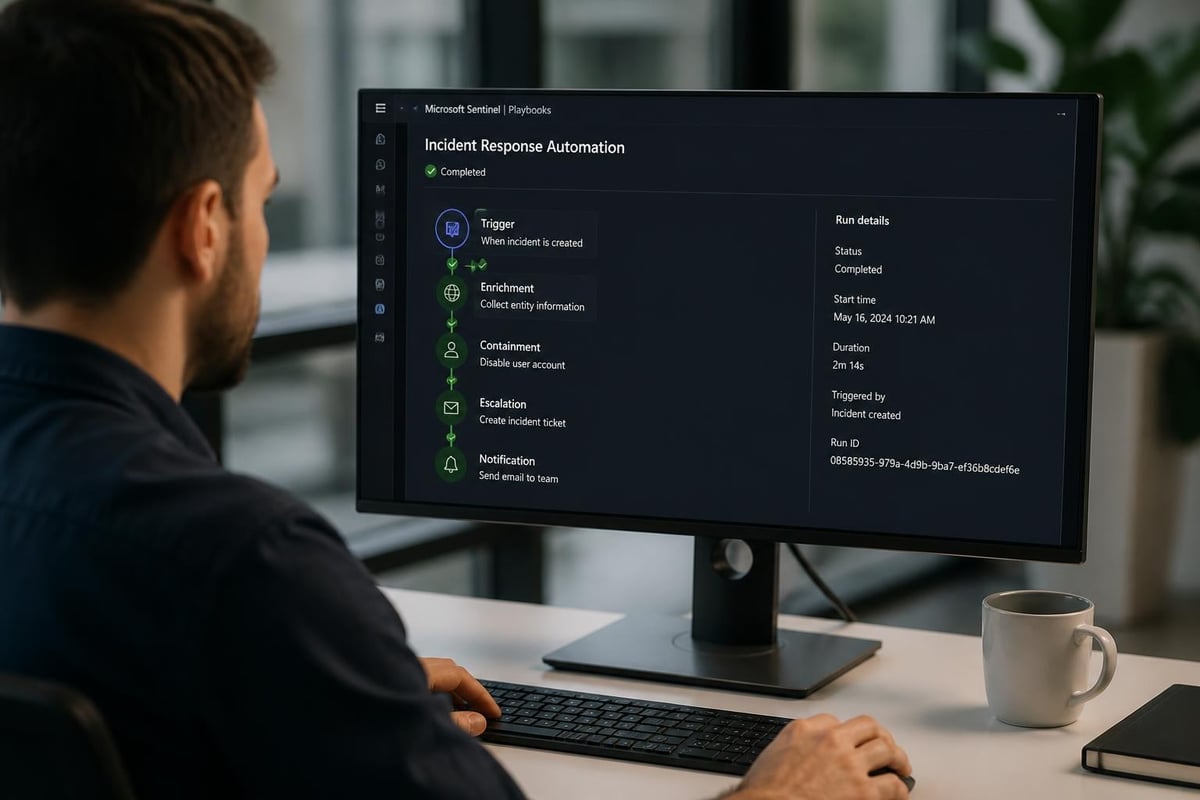
Security orchestration extends beyond microsoft siem boundaries through API integrations. Playbooks call firewall APIs to block malicious IPs, submit files to sandboxes for analysis, and update threat intelligence platforms with newly discovered indicators. This cross-platform orchestration creates a coordinated defense that responds faster than human operators.
Cloud-native microsoft siem platforms introduce consumption-based pricing that differs fundamentally from traditional license models. Organizations pay for data ingested and retained rather than per-device or per-user fees. This model rewards efficient data management and penalizes unfocused collection.
Microsoft Sentinel pricing comprises three components: data ingestion, log retention, and logic app executions. Ingestion costs dominate for most deployments, ranging from $2.46 to $3.50 per GB depending on commitment tier and regional pricing.
A typical enterprise ingesting 500 GB daily faces approximately $45,000 monthly ingestion costs before optimization. Strategic filtering and retention policies routinely reduce this by 30-50% without sacrificing security visibility.
Retention costs add $0.12 per GB monthly for data stored beyond 90 days. Organizations must balance compliance requirements against storage expenses when defining retention policies. High-value security logs warrant extended retention while verbose diagnostic logs often need only short-term storage.
The Forrester Total Economic Impact study analyzed deployments across multiple industries and found that organizations achieved 188% ROI over three years through reduced breach impact, consolidated tooling, and analyst productivity gains.
Effective cost control begins before data enters the microsoft siem workspace. Pre-ingestion filtering eliminates noise while preserving security signal. Modern firewall logs, for example, often include verbose debug information valuable for troubleshooting but irrelevant for threat detection.
| Log Source | Typical Daily Volume | Security Value | Recommended Retention |
|---|---|---|---|
| Azure AD Sign-ins | 50-200 GB | Critical | 180 days |
| Defender for Endpoint | 30-100 GB | Critical | 90 days |
| Azure Activity Logs | 10-50 GB | High | 90 days |
| Firewall Connection Logs | 100-500 GB | Medium | 30 days |
| Application Debug Logs | Variable | Low | 7 days or exclude |
Basic Log ingestion offers 80% cost savings for high-volume sources where real-time querying isn't essential. These logs support scheduled analytics and threat hunting while reducing immediate query performance requirements.
Microsoft Sentinel's power multiplies when integrated with complementary security services that share telemetry and threat intelligence bidirectionally. The microsoft siem becomes the central pane of glass for security operations while specialized tools provide deep prevention and protection capabilities.
Microsoft Defender for Endpoint, Identity, Office 365, and Cloud Apps feed rich telemetry into Sentinel while consuming its threat intelligence and automation capabilities. This bidirectional integration creates closed-loop security operations.
When Sentinel identifies a compromised endpoint through behavioral analytics, it triggers Defender for Endpoint to isolate the device and initiate forensic data collection. Conversely, when Defender detects a suspicious process execution, Sentinel correlates it with authentication logs, network traffic, and email activity to determine full attack scope.
According to research from SANS Institute, organizations using integrated security platforms detect threats 40% faster than those with siloed tools requiring manual correlation.
Modern security operations rarely run exclusively on Microsoft technologies. The microsoft siem platform provides connectors for over 100 third-party products through native integrations, REST APIs, Syslog forwarding, and Common Event Format ingestion.
Critical integration categories include:
Physical security systems represent an often-overlooked integration opportunity. Organizations can correlate access control events from building security with IT system access to detect credential theft and insider threats. When an employee badge swipes into a facility in Johannesburg while their account authenticates from Lagos simultaneously, this correlation indicates compromise that neither system detects alone.
Successful microsoft siem deployment follows a phased approach that builds capability progressively rather than attempting full implementation simultaneously. Organizations rushing to enable every feature create overwhelming alert volumes that burn out security teams.
Initial deployment focuses on high-value, low-noise data sources that demonstrate immediate value. Microsoft security product logs (Defender, Azure AD) provide excellent starting points because they arrive pre-normalized with built-in analytics.
Week 1-2 objectives:
Week 3-4 objectives:
This foundation typically generates 10-50 incidents daily that security teams can realistically investigate while building operational rhythm.
After establishing baseline operations, organizations expand data sources and develop custom detections addressing their unique risk profile and compliance requirements.
Network device integration provides visibility into lateral movement and data exfiltration. Application logs expose suspicious user behavior and privilege escalation. Cloud infrastructure monitoring detects misconfiguration and unauthorized resource deployment.
Custom analytics rules encode organizational security policies and threat models. A financial services firm might create detections for unusual trading patterns, while healthcare organizations focus on unauthorized access to patient records.
The Cloud Security Alliance guidance defines maturity levels for cloud SIEM operations that help organizations assess capabilities and plan improvements. Maturity progression moves from reactive incident response toward proactive threat hunting and automated prevention.
Maturity indicators for microsoft siem programs:
Most organizations operate at Level 2 within 6-12 months of deployment, with progression to Level 3 requiring 18-24 months of continuous improvement and process refinement.
Security monitoring requirements appear across virtually every regulatory framework, from GDPR and HIPAA to PCI-DSS and SOC 2. The microsoft siem platform addresses these mandates through comprehensive logging, retention controls, and audit trail preservation.
Compliance frameworks specify which events must be logged, how long records must be retained, and who can access security data. Sentinel's role-based access control restricts investigation privileges while maintaining detailed activity logs showing who viewed sensitive incident data.
Key compliance capabilities:
The platform supports compliance reporting through scheduled workbooks that export required metrics. Organizations demonstrate to auditors that security monitoring covers mandated systems, alerts trigger for specified conditions, and incidents receive documented investigation and resolution.
CISA guidance on incident monitoring emphasizes integrating SIEM capabilities into broader incident response programs rather than treating security monitoring as standalone compliance checkbox. Effective programs use microsoft siem insights to continuously improve defensive controls and validate prevention efficacy.
Automated detections catch known attack patterns, but sophisticated adversaries employ novel techniques that evade rules-based systems. Proactive threat hunting complements automated detection by searching for subtle indicators that machines miss.
Microsoft Sentinel supports hypothesis-driven hunting through interactive notebooks and saved queries. Hunters formulate theories about potential compromises based on threat intelligence, then query telemetry looking for evidence supporting or refuting these hypotheses.
Successful hunts begin with specific, testable hypotheses rather than aimless data exploration. Strong hypotheses derive from understanding adversary tradecraft and applying it to your environment's unique characteristics.
Example hunting hypotheses:
Hunters construct KQL queries that search for these patterns across relevant timeframes. The microsoft siem query language provides powerful operators for statistical analysis, temporal correlation, and entity relationship mapping.
Documented hunts become scheduled analytics when patterns prove reliable. This evolutionary approach transforms manual investigation into automated detection, continuously expanding coverage against emerging threats.
Microsoft SIEM capabilities through Sentinel provide security operations teams with cloud-native tools for threat detection, investigation, and response at scale. Just as comprehensive digital security requires integrated monitoring and automated response, physical security demands the same systematic approach to protecting people and property. Limax Security Specialists brings decades of expertise installing advanced security solutions across South African residential and commercial properties, from burglar-resistant gates to comprehensive perimeter protection systems. Contact our team today for a free security assessment and discover how professional-grade installations create layered defense protecting what matters most.


